





DeepL Translate for TYPO3
The DeepL Translate Extension for TYPO3 makes it possible to automatically translate content into other languages with the highest quality and publish it directly. Since TYPO3 version 9, the extension has been continuously developed and always supports the latest TYPO3 versions.
As of April 2026, the DeepL Translate Extension had already been downloaded and installed over 350,000 times—clear evidence of its popularity and reliability.
Through the Extended Access Program for the DeepL Translate Extension for TYPO3, partners receive the following services and benefits:
- Access to the TYPO3 extension DeepL Translate Core v6.x for TYPO3 v13 LTS and v14 LTS
- Access to the TYPO3 extension DeepL Translate Core v5.x for TYPO3 v13 LTS and v12 LTS
- Access to the TYPO3 extension DeepL Translate Glossary v6.x for TYPO3 v13 LTS and v14 LTS
- Access to the TYPO3 extension DeepL Translate Glossary v5.x for TYPO3 v13 LTS and v12 LTS
- Access to version 4.x of wv_deepltranslate for TYPO3 12 LTS and 11 LTS
- Access to the code repository for 12 months; access for Composer users for 15 months
- Priority access to support services
- Logo and backlink on the DeepL Translate page
- Preview: Access to demo instances with exclusive insights
- Exclusive: “Enable Translated Content” add-on—activates all translated content on a page with the click of a button. No more tedious activation of individual content elements.
- Exclusive: The “DeepL Translate Assets” add-on translates file metadata in TYPO3’s Filelist module
- Exclusive: The “DeepL Translate Bulk” add-on translates pages—including subpages and content elements—asynchronously.
- Exclusive: The DeepL Translate Auto-Renew add-on automatically generates translations and updates content when the originals are edited.
- FREE: DeepL Write Extension for TYPO3 v13 and v14 LTS
- NEW: DeepL Translate External Glossary - Synchronizes externally created glossaries with TYPO3
DeepL Translate Assets
Translations for images, documents, and files
With DeepL Translate for TYPO3, it has always been possible to translate embedded documents or images within a content element fully automatically. This meant that alt text, title text, and image captions in translated content were automatically translated using DeepL.
The new DeepL Asset Translate add-on now adds new features to TYPO3’s Filelist module, enabling the automatic translation of file metadata for alternative languages using DeepL. Even if DeepL is no longer used to translate content elements on pages, TYPO3 can still access the files’ previously translated metadata. Translation via DeepL Asset Translate thus conserves the available DeepL API quota.
DeepL Bulk Translation
Bulk Translation of Pages and Content Elements
Automatic bulk translation of pages or entire page trees has long been one of the most requested features for the DeepL Translate Extension for TYPO3.
With the now-available developer preview version of "DeepL Translate Bulk," this exact feature can be accessed via the context menu in the TYPO3 page tree. In a submenu of the context menu, you can choose to mark either a single page or the page along with its subordinate subpages recursively for bulk translation.
The configurable scheduler then processes the pages marked for bulk translation asynchronously in configurable batches, at configurable intervals, and at any time. Asynchronous processing ensures that neither the DeepL API nor your own server is overloaded, while also allowing the translation process to take place outside of regular business hours.
DeepL Translate Auto
Automatically translate new content
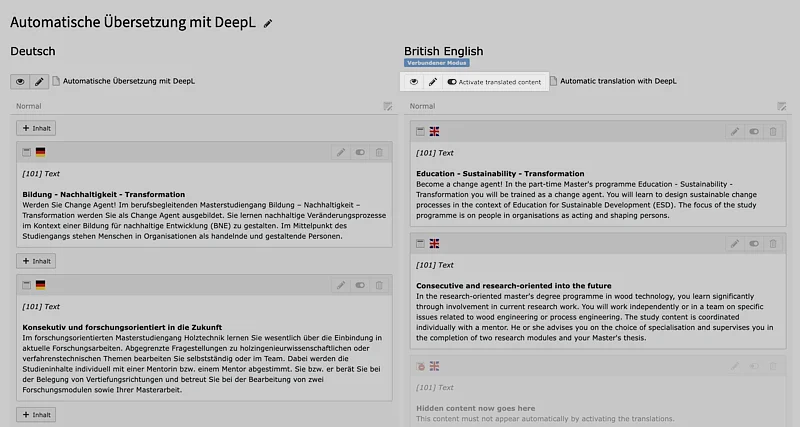
Once a TYPO3 website has been translated into multiple languages, editors want new pages and content to be translated automatically going forward. Until now, this required the editor in charge to manually initiate the translation process, review the translated content, and finally approve it for publication. With the introduction of the Auto-Translate feature, this process is now significantly simplified.
In the TYPO3 instance, the Auto-Translate feature can be enabled or disabled directly in the site configuration for the desired pages. This allows administrators to selectively enable the feature for individual pages within a multisite instance. Additional configuration options for enabling or disabling auto-translation can be found in the individually configured language settings, allowing the feature to be controlled specifically for certain languages.
Once the Auto-Translate feature is configured, alternative language versions are automatically created when new pages are created, and the page properties are automatically translated by DeepL. If an editor creates a new content element on the page, it is also automatically translated into all configured languages. The editorial work is then limited solely to reviewing and publishing the content.
DeepL Translate Renew
Synchronizes the original and the translation
When managing multiple languages on a TYPO3 website, editors often work in the default language or their native language. Even if the pages are occasionally translated into other languages, updates to the translated content elements may sometimes be overlooked.
The Renew Translation feature in DeepL Translate for TYPO3 helps editors keep original content and translations in sync.
Both the Renew Translation and Auto-Translatefeatures are closely linked and offer corresponding toggles in the page configuration, individual language settings, and page properties.
Once configured and activated, Renew Translation ensures that linked translations of pages and content elements are updated using DeepL as soon as the original content element is modified and saved.
Enable Translated Content
Publishing Translations with a Single Click
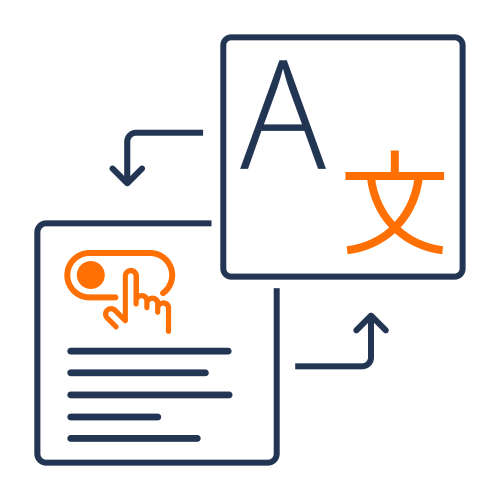
When you create a translation of content elements in TYPO3, TYPO3 typically assumes that these are hidden at first. This is to ensure that the necessary content can be entered in the translated languages, then reviewed, and finally approved and published.
To do this, editors must review and activate each individual content element so that the translation can then be displayed on the corresponding language page. This task is particularly tedious and time-consuming for content pages with many different content elements.
The “Enable Translated Content” add-on extension now allows web editorial staff to publish all translated content elements on a page with a single click directly from the TYPO3 page module, thereby saving valuable time. The extension was developed without any direct dependency on DeepL Translate and can therefore be used independently of it.
DeepL Translate Glossary
No More Incorrectly Translated Technical Terms
Most automatic translation services often reach their limits when it comes to technical terms, brand names, or terms with specific meanings in different languages.
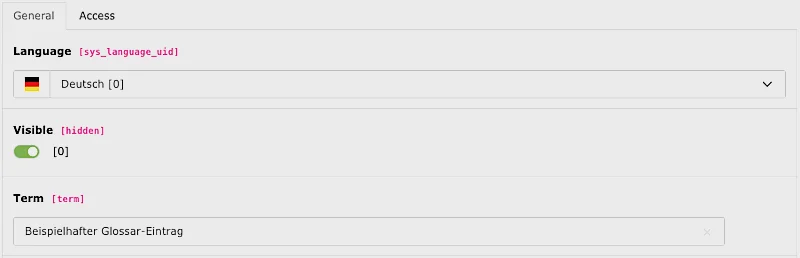
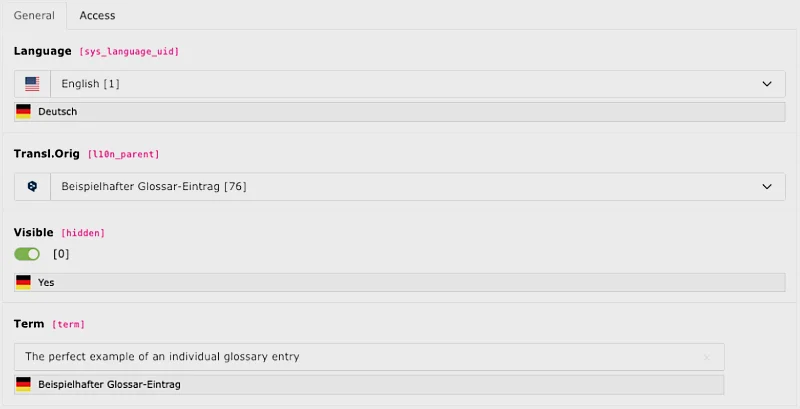
With DeepL Translate’s glossary feature, this problem is a thing of the past. You can create custom glossary entries centrally and conveniently with a single click and assign them precise, contextually accurate translations. This ensures that your terminology is translated consistently and accurately—regardless of language or context. This feature is particularly valuable for companies, universities, and institutions that rely on subject-specific and brand-compliant content in their communications.
A unique feature of the TYPO3 extension DeepL Translate is the ability to create multiple glossaries per TYPO3 instance. These glossaries can be managed individually at the multi-site level, allowing them to be optimally tailored to the specific requirements of each individual website. During automatic translation with DeepL, the glossaries are always taken into account within the respective website context to ensure a precise and contextually accurate translation.

DeepL Translate - Early Access Partner
The following Early Access partners—including digital agencies, industrial companies, universities, educational institutions, and public-sector organizations—are already successfully using the DeepL Translate Extension to produce high-quality, automated, and privacy-compliant translations powered by AI technology “Made in Germany.”

























































DeepL Translate - Feature Sponsors
The following educational institutions joined forces to pool their needs and commissioned web-vision to develop new features for the DeepL Translate Extension. They worked together to define the requirements and jointly funded the development. Thanks to this cooperative approach to development, the glossary feature, the labeling for automatic translations, and the simplified approval process with “Enable Translated Content” were successfully implemented.








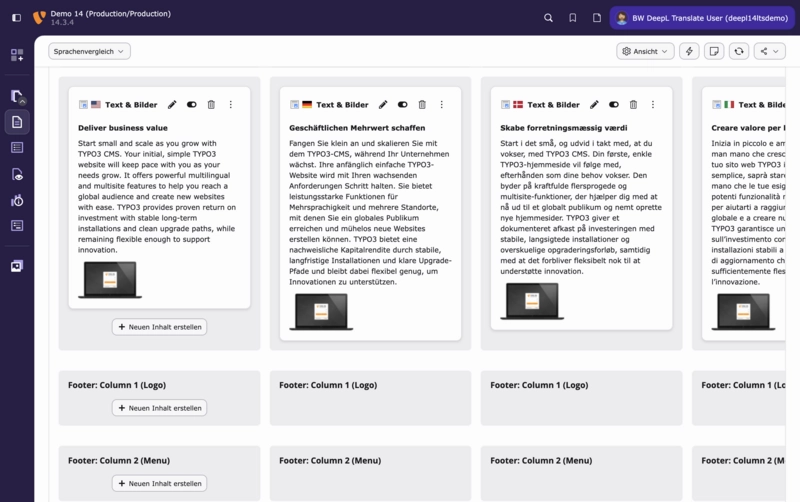
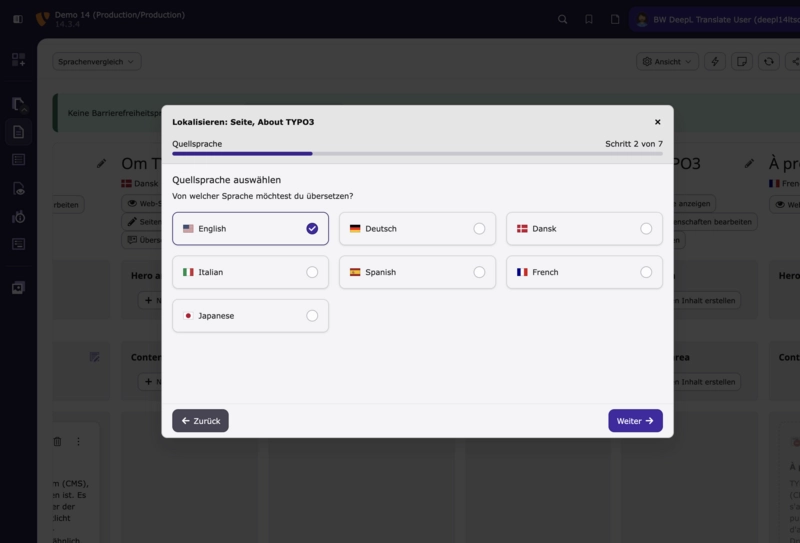
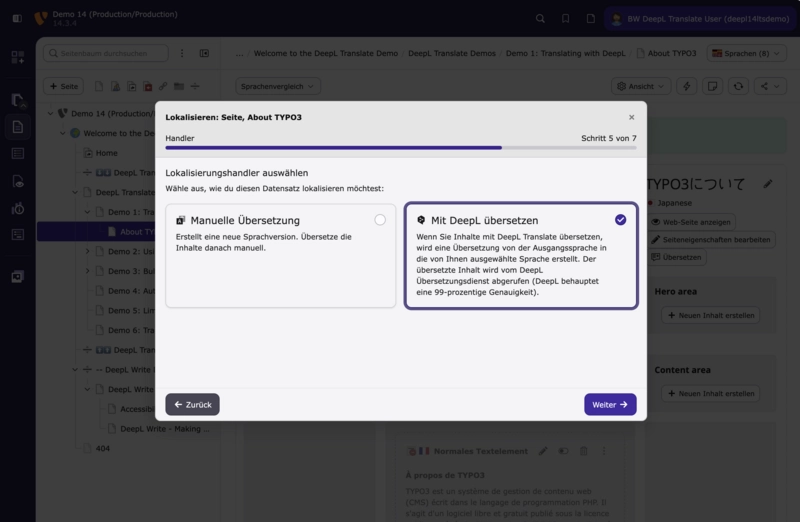
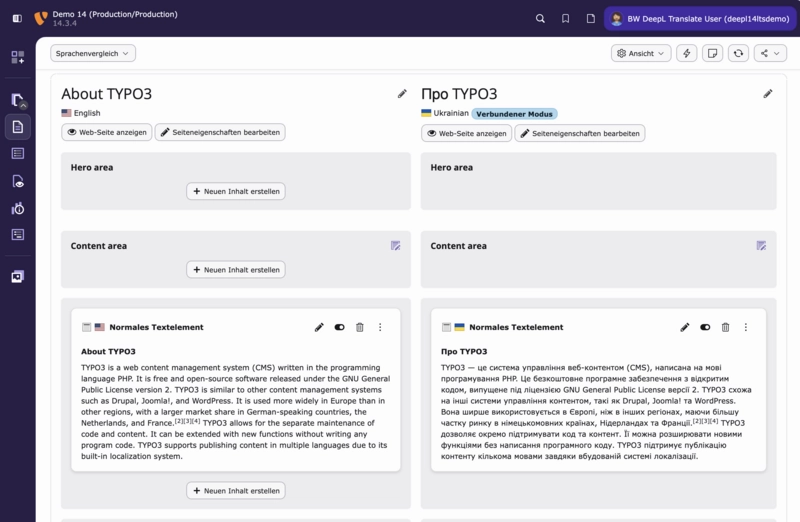
Once you've created content in your website's default language, you have several options for conveniently translating it directly in the backend. The DeepL Translate Extension for TYPO3 works in both page and list views, allowing you to use all translation features in your preferred backend view.
After clicking the “Translate” button (page view) or the flag of the desired target language (list view), the extension guides you through the user-friendly translation workflow.
Simply select DeepL as your preferred translation method and follow the instructions.
After confirming your selection of the content elements to be translated, you’ll receive your translation within a few seconds.
Which version of the DeepL extension is compatible with which version of TYPO3?
- Version 6.0 of DeepL Translate Core and Glossary are compatible with TYPO3 Version 13 LTS and TYPO3 14 LTS.
- Version 5.0 of DeepL Translate Core and Glossary are compatible with TYPO3 Version 12 LTS and TYPO3 13 LTS.
- Version 4.0 of DeepL Translate Core and Glossary are compatible with TYPO3 Version 11 LTS and TYPO3 12 LTS.
- Version 3.0 of the wv_deepltranslate extension supports the older TYPO3 versions 9, 10, and 11 LTS.
How can I renew my Packagist account?
Starting in July 2026, customers who have previously gained access to DeepL Translate EAP will have the option to extend their Packagist access. The following options are available:
- Renewal of Packagist access for the older EAP versions as “DeepL Translate Extended Packagist Access.” Based on the order date, the Packagist account for the older versions will be activated for an additional 12 months at a cost price of 29.00 EUR net per year.
Not included: Access to new add-ons, features, and the latest developments for TYPO3 v14. - With DeepL Translate EAP One-Time, you receive new Packagist access valid for 15 months at a price of 985 EUR net.
Included is: access to new add-ons, features, and the latest developments for TYPO3 v14. - With the DeepL Translate EAP Subscription, you receive permanent access to Packagist for a period of 12 months. The subscription is automatically renewed after 12 months.
Included: access to new add-ons, features, and the latest developments for TYPO3 v14.
Do the changes to the DeepL API regarding GET parameters also affect the DeepL Translate Extensions?
Since January 14, 2025, DeepL has been informing users with API accounts as follows:
“You will no longer be able to send GET requests or query parameters to the /translate endpoint. Going forward, /translate will accept only POST requests with data included in the request body.”
“You will no longer be able to authenticate a request to any endpoint by sending an API key in a query parameter. Instead, send your API key in an HTTP header named Authorization.”
This does not affect the DeepL Translate Extensions or their add-ons for TYPO3. For about three years now, the DeepL Translate Extensions (version 4.x and later) have been using only POST requests to send data to DeepL.
Who is the TYPO3 DeepL Translate extension intended for?
The TYPO3 extension DeepL Translate is ideal for websites or platforms that want to automatically translate large amounts of content quickly, accurately, and reliably. It is particularly geared toward audiences such as universities with multilingual websites, as well as other TYPO3-based, multilingual platforms.
With DeepL Translate, you get professional translations of your content at the click of a button—without any time-consuming back-and-forth with translation agencies. If you use subject-specific terminology in your online communications, the integrated glossary feature ensures consistent and accurate translations, tailored precisely to your needs.
How can I test automatic translation using TYPO3 and DeepL?
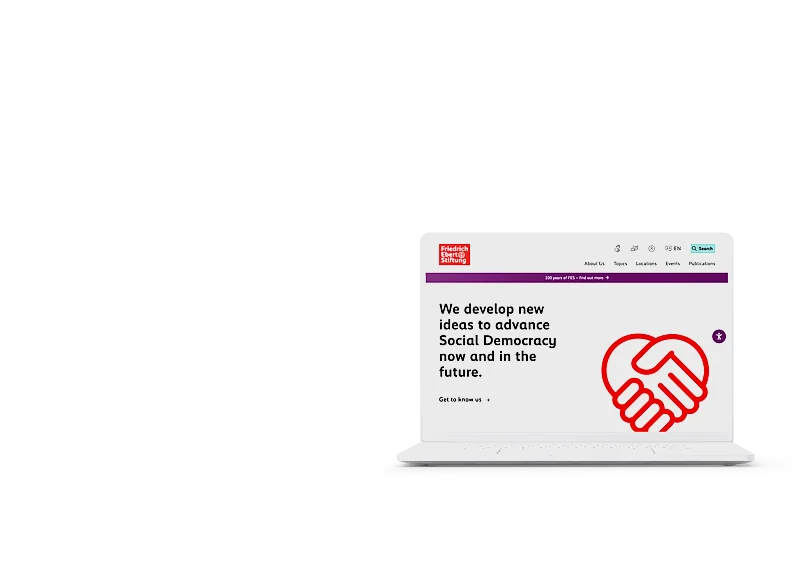
View this page in English here. The full translation was generated automatically using TYPO3 and DeepL, without any editing by a human editor. Alternatively, register for the TYPO3 v13 or v14 demo instances and DeepL Translate with all available add-ons, and test the translation features yourself. After submitting the demo registration form, you will immediately receive your login credentials.
What features does DeepL Translate for TYPO3 offer?
Once the extension has been integrated into your TYPO3 installation, DeepL Translate enables your editors to translate your content fully automatically right within the TYPO3 backend. Through direct, multi-step communication with the DeepL API, the translation is completed in just a few seconds.
The translated content is automatically created in the TYPO3 backend as an additional page language, complete with all existing content elements. After a visual review and any necessary corrections, your editor can simply click to publish the translated content for the alternative page language.
The effort required to manage multilingual websites, create texts, and produce new localizations for your website is significantly reduced through the use of TYPO3 and DeepL Translate.
The glossary feature for DeepL Translate is also available as a separate open-source base extension.
Are there any videos about DeepL Translate?
Yes. We regularly post screencasts showing new features available in the DeepL Translate Extension as videos on the web-vision YouTube channel. Currently, the following videos are available there:
Will there be a DeepL Translate for TYPO3 v14?
Yes, DeepL Translate Core and DeepL Translate Glossary have been available in the TYPO3 Extension Repository for TYPO3 v14 LTS since April 27, 2026. The DeepL Translate add-ons for TYPO3 v14 have been available since the end of May 2026. The DeepL Write extension has also been available for free via packagist.org or in the TYPO3 Extension Repository (TER) since the end of May 2026.
Participants in the Extended Access Program receive free access to the add-ons’ Git repositories and, as long as their Packagist token is valid, can also install and use the versions compatible with TYPO3 v14.
An additional Extended Access Program is not required if a valid token is already available.
Is there a DeepL Translate for TYPO3 v13?
Yes, DeepL Translate Core and DeepL Translate Glossary have been available in the TYPO3 Extension Repository for TYPO3 v13 LTS since December 19, 2024. As of May 1, 2025, the add-on extensions Enable-Translated-Content and DeepL Translate Bulk are already compatible with TYPO3 v12 and v13 LTS.
DeepL Translate Auto-Renew and DeepL Translate Assets will follow in the coming days and weeks.
Participants in the Early Access Program receive free access to the Git repositories and, as long as their Packagist token is valid, can also install and use the v13-compatible versions.
An additional Early Access program is not required as long as a valid token is already available.
Can I order the DeepL API key on an invoice basis, even without a credit card?
Yes, as part of our partnership with DeepL, we offer the option to order an API key, along with the required minimum quota of 20.00 EUR for 1 million characters, via automated billing. Each customer receives their own API key with the corresponding quota allocation. You can purchase the DeepL API Pro Key through our hosting shop here, with payment by invoice.
Do you also offer a subscription for the DeepL Translate Extensions?
Yes. Since we have received an increasing number of inquiries from existing partners in recent weeks, we are now also offering the new EAP as a plan with automatic renewal every 12 months. The introductory price is 750.00 EUR net per year.
The EAP can be conveniently purchased and paid for through our online store, either in conjunction with a subscription or independently:
https://www.domains-vision.de/store/software


DeepL is a technology company based in Cologne that specializes in the development of artificial intelligence for language processing. The DeepL Translator has been available as a website at https://www.deepl.com for over five years and offers a free machine translation system based on neural networks that delivers translations of unprecedented quality.
In March 2018, DeepL Pro was released—an extension of the platform that provides a professional API (application programming interface) as well as advanced translation capabilities. This is exactly where web-vision’s development comes in: For the TYPO3 content management system, web-vision has developed a comprehensive portfolio of translation tools that enable direct integration with DeepL and take automated translation to a new level.
More information about the DeepL Translate Extension
The TYPO3 extension “wv_deepltranslate,” also known as “DeepL Translate” for TYPO3, is not a service offered by DeepL SE, Maarweg 165, 50825 Cologne. The TYPO3 extension and its add-ons are developed for TYPO3 by web-vision GmbH.
To use it, you need access to a DeepL API subscription. This is available as a DeepL Developer Subscription for €4.99 per month (as of 05/2024). You pay for the translation service based on your individual usage (€20.00 per 1,000,000 translated characters).
- Link to the German-language documentation for the TYPO3 extension wv_deepltranslate
- Link to wv_deepltranslate on GitHub
- Link to wv_deepltranslate in the TYPO3 Extension Repository (TER)
- Link to the DeepL Translate demo for TYPO3 12 LTS
- Link to DeepL Translate Early Access Partner Registration
- Link to the DeepL API Key via invoice payment
Do you manage a multilingual Magento store and want similar functionality for fast, fully automated translations of product information or store content? Then check out our Magento 2 extension, DeepL Translator,here!
(Note: The feature set of the Magento extension differs from that of the TYPO3 DeepL Translate extension).